

//
// AppDelegate.swift
// MovieLJY
//
// Created by comsoft on 2026/05/04.
//
import UIKit
@main
class AppDelegate: UIResponder, UIApplicationDelegate {
func application(_ application: UIApplication, didFinishLaunchingWithOptions launchOptions: [UIApplication.LaunchOptionsKey: Any]?) -> Bool {
// Override point for customization after application launch.
return true
}
// MARK: UISceneSession Lifecycle
func application(_ application: UIApplication, configurationForConnecting connectingSceneSession: UISceneSession, options: UIScene.ConnectionOptions) -> UISceneConfiguration {
// Called when a new scene session is being created.
// Use this method to select a configuration to create the new scene with.
return UISceneConfiguration(name: "Default Configuration", sessionRole: connectingSceneSession.role)
}
func application(_ application: UIApplication, didDiscardSceneSessions sceneSessions: Set<UISceneSession>) {
// Called when the user discards a scene session.
// If any sessions were discarded while the application was not running, this will be called shortly after application:didFinishLaunchingWithOptions.
// Use this method to release any resources that were specific to the discarded scenes, as they will not return.
}
}
AppDelegate.swift
import UIKit
// MARK: - 축구선수 데이터 구조체
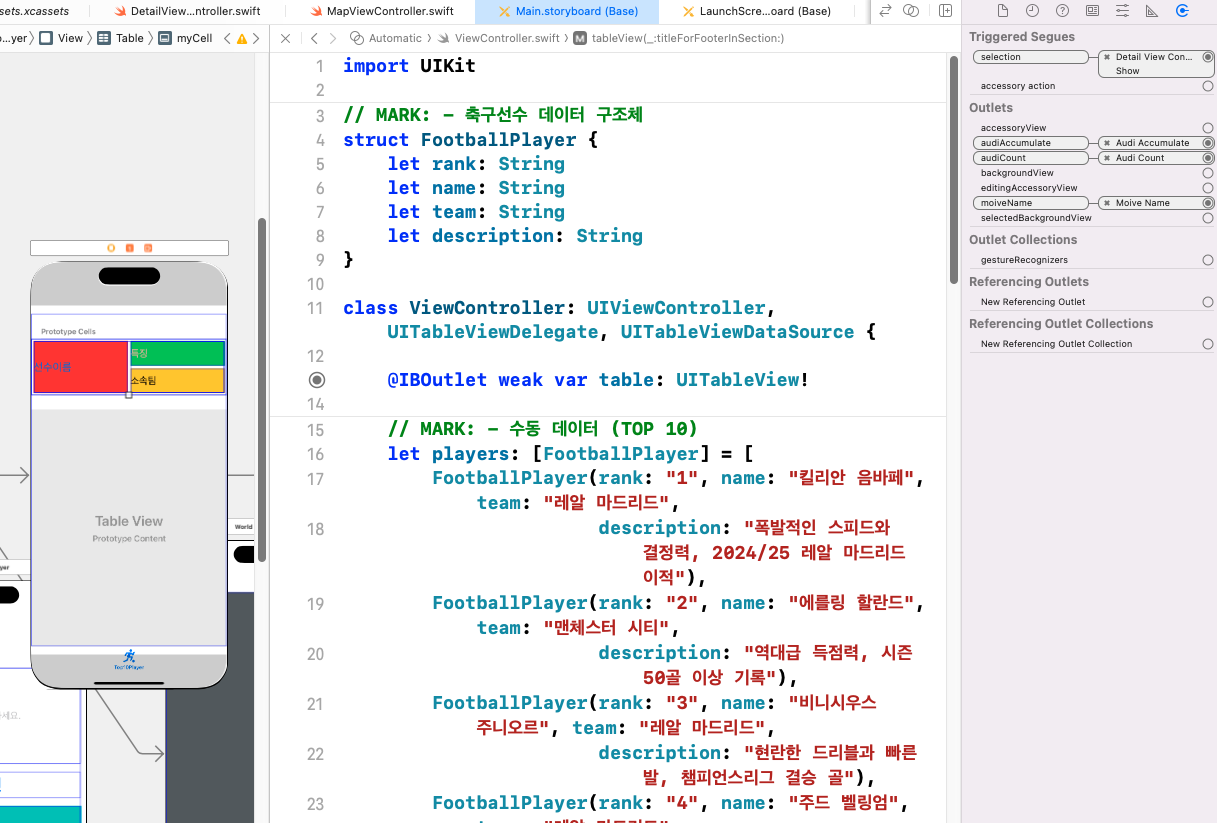
struct FootballPlayer {
let rank: String
let name: String
let team: String
let description: String
}
class ViewController: UIViewController, UITableViewDelegate, UITableViewDataSource {
@IBOutlet weak var table: UITableView!
// MARK: - 수동 데이터 (TOP 10)
let players: [FootballPlayer] = [
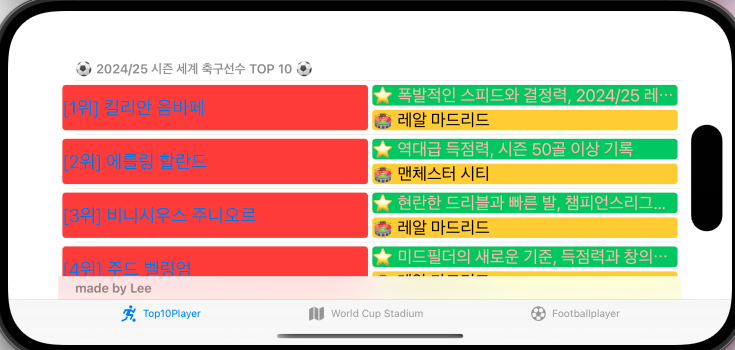
FootballPlayer(rank: "1", name: "킬리안 음바페", team: "레알 마드리드",
description: "폭발적인 스피드와 결정력, 2024/25 레알 마드리드 이적"),
FootballPlayer(rank: "2", name: "에를링 할란드", team: "맨체스터 시티",
description: "역대급 득점력, 시즌 50골 이상 기록"),
FootballPlayer(rank: "3", name: "비니시우스 주니오르", team: "레알 마드리드",
description: "현란한 드리블과 빠른 발, 챔피언스리그 결승 골"),
FootballPlayer(rank: "4", name: "주드 벨링엄", team: "레알 마드리드",
description: "미드필더의 새로운 기준, 득점력과 창의성 겸비"),
FootballPlayer(rank: "5", name: "필 포든", team: "맨체스터 시티",
description: "잉글랜드 최고의 재능, 섬세한 기술과 침착한 마무리"),
FootballPlayer(rank: "6", name: "하미 살라", team: "리버풀",
description: "꾸준한 득점과 어시스트, 리버풀의 레전드"),
FootballPlayer(rank: "7", name: "리오넬 메시", team: "인테르 마이애미",
description: "역대 최고의 선수, 발롱도르 8회 수상"),
FootballPlayer(rank: "8", name: "크리스티아누 호날두", team: "알나스르",
description: "통산 900골 돌파, 불굴의 득점 본능"),
FootballPlayer(rank: "9", name: "로드리", team: "맨체스터 시티",
description: "발롱도르 수상, 완벽한 수비형 미드필더"),
FootballPlayer(rank: "10", name: "라민 야말", team: "FC 바르셀로나",
description: "17세 유럽선수권 우승, 차세대 최고 유망주")
]
// MARK: - TableView
func tableView(_ tableView: UITableView, numberOfRowsInSection section: Int) -> Int {
return players.count
}
func tableView(_ tableView: UITableView, cellForRowAt indexPath: IndexPath) -> UITableViewCell {
let cell = tableView.dequeueReusableCell(withIdentifier: "myCell", for: indexPath) as! MyTableViewCell
let player = players[indexPath.row]
cell.moiveName.text = "[\(player.rank)위] \(player.name)"
cell.audiCount.text = "🏟 \(player.team)"
cell.audiAccumulate.text = "⭐ \(player.description)"
return cell
}
func tableView(_ tableView: UITableView, titleForHeaderInSection section: Int) -> String? {
return "⚽ 2024/25 시즌 세계 축구선수 TOP 10 ⚽"
}
func tableView(_ tableView: UITableView, titleForFooterInSection section: Int) -> String? {
return "made by Lee"
}
func numberOfSections(in tableView: UITableView) -> Int {
return 1
}
// MARK: - Life Cycle
override func viewDidLoad() {
super.viewDidLoad()
table.delegate = self
table.dataSource = self
table.rowHeight = UITableView.automaticDimension
table.estimatedRowHeight = 80
}
// MARK: - Segue
override func prepare(for segue: UIStoryboardSegue, sender: Any?) {
guard let dest = segue.destination as? DetailViewController,
let indexPath = table.indexPathForSelectedRow else { return }
dest.movieName = players[indexPath.row].name
}
}
ViewController.swift
//
// DetailViewController.swift
// MovieLJY
//
// Created by comsoft on 2026/06/01.
//
import UIKit
import WebKit
class DetailViewController: UIViewController {
var movieName = ""
@IBOutlet weak var webView: WKWebView!
override func viewDidLoad() {
super.viewDidLoad()
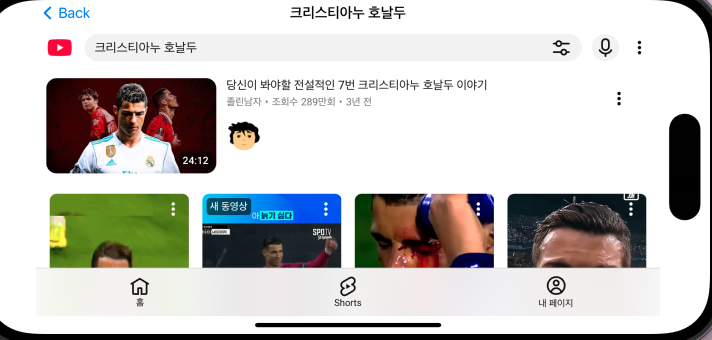
navigationItem.title = movieName
let urlKorString =
"https://www.youtube.com/results?search_query=" + movieName
//let urlKorString =
"https://search.naver.com/search.naver?where=nexearch&sm=top_hty&fbm=0&ie=utf8&query=" + movieName
let urlString =
urlKorString.addingPercentEncoding(withAllowedCharacters: .urlQueryAllowed)!
guard let url = URL(string: urlString) else { return }
let request = URLRequest(url: url)
webView.load(request)
// Do any additional setup after loading the view.
}
/*
// MARK: - Navigation
// In a storyboard-based application, you will often want to do a little preparation before navigation
override func prepare(for segue: UIStoryboardSegue, sender: Any?) {
// Get the new view controller using segue.destination.
// Pass the selected object to the new view controller.
}
*/
}
DetailViewController.swift

//
// MapViewController.swift
// MovieLJY
//
// Created by comsoft on 2026/06/01.
//
import UIKit
import WebKit
class MapViewController: UIViewController {
@IBOutlet weak var webView: WKWebView!
override func viewDidLoad() {
super.viewDidLoad()
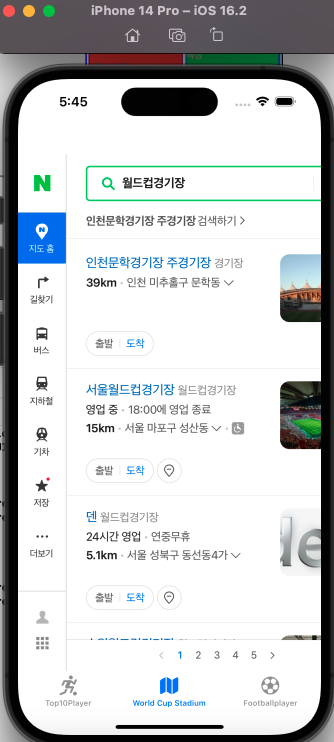
let urlKorString = "https://map.naver.com/p/search/월드컵경기장"
let urlString = urlKorString.addingPercentEncoding(withAllowedCharacters: .urlQueryAllowed)!
guard let url = URL(string:urlString) else { return }
let request = URLRequest(url: url)
webView.load(request)
// Do any additional setup after loading the view.
}
/*
// MARK: - Navigation
// In a storyboard-based application, you will often want to do a little preparation before navigation
override func prepare(for segue: UIStoryboardSegue, sender: Any?) {
// Get the new view controller using segue.destination.
// Pass the selected object to the new view controller.
}
*/
}
MapViewController.swift
import UIKit
// MARK: - Gemini 요청 구조체 (기존 유지)
struct GeminiRequest: Encodable {
let contents: [RequestContent]
}
struct RequestContent: Encodable {
let parts: [RequestPart]
}
struct RequestPart: Encodable {
let text: String
}
// MARK: - Gemini 응답 구조체 (기존 유지)
struct GeminiResponse: Decodable {
let candidates: [Candidate]
}
struct Candidate: Decodable {
let content: ResponseContent
}
struct ResponseContent: Decodable {
let parts: [ResponsePart]
}
struct ResponsePart: Decodable {
let text: String
}
// MARK: - GeminiViewController
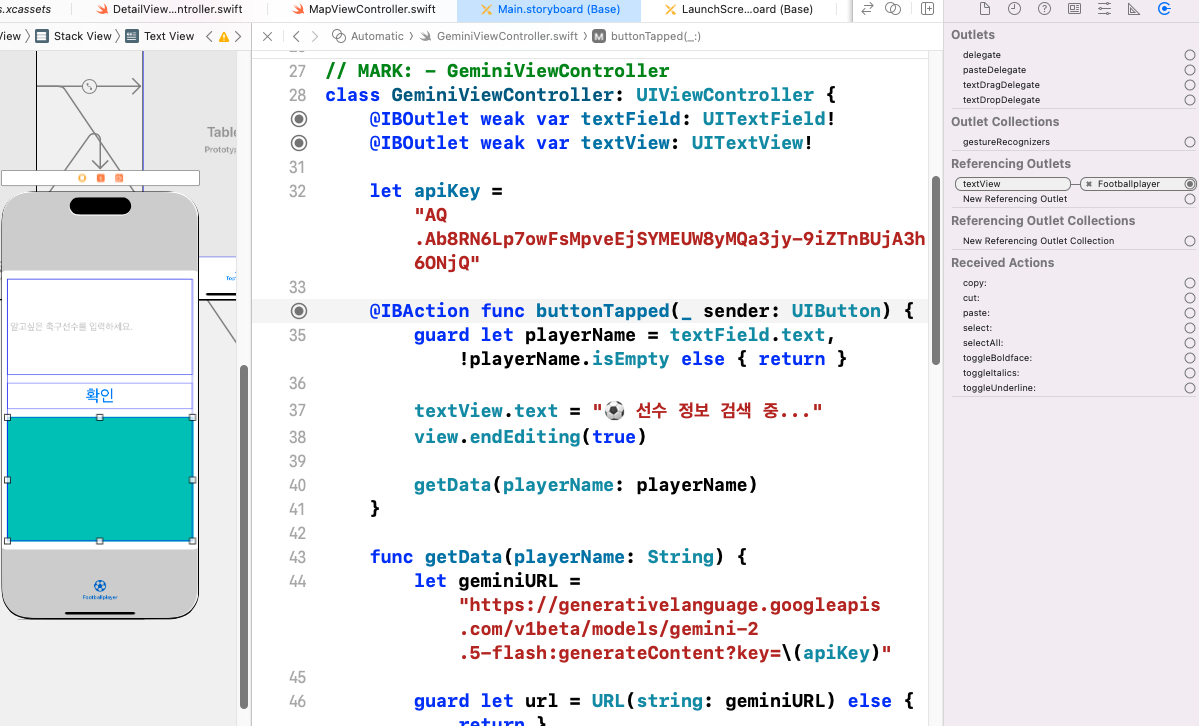
class GeminiViewController: UIViewController {
@IBOutlet weak var textField: UITextField!
@IBOutlet weak var textView: UITextView!
let apiKey = "AQ.Ab8RN6Lp7owFsMpveEjSYMEUW8yMQa3jy-9iZTnBUjA3h6ONjQ"
@IBAction func buttonTapped(_ sender: UIButton) {
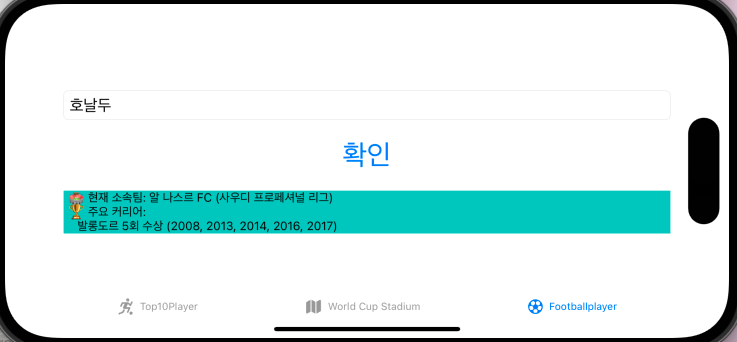
guard let playerName = textField.text, !playerName.isEmpty else { return }
textView.text = "⚽ 선수 정보 검색 중..."
view.endEditing(true)
getData(playerName: playerName)
}
func getData(playerName: String) {
let geminiURL = "https://generativelanguage.googleapis.com/v1beta/models/gemini-2.5-flash:generateContent?key=\(apiKey)"
guard let url = URL(string: geminiURL) else { return }
// 축구선수 정보를 요청하는 프롬프트
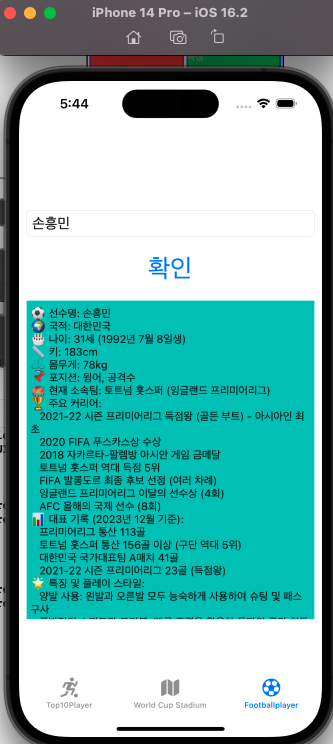
let prompt = """
축구선수 '\(playerName)'에 대해 아래 형식으로 한국어로 알려줘.
선수가 존재하지 않으면 "해당 선수를 찾을 수 없습니다"라고만 답해줘.
⚽ 선수명:
🌍 국적:
🎂 나이:
📏 키:
⚖️ 몸무게:
📌 포지션:
🏟 현재 소속팀:
🏆 주요 커리어:
📊 대표 기록 (골, 어시스트 등):
🌟 특징 및 플레이 스타일:
"""
let requestBody = GeminiRequest(
contents: [RequestContent(parts: [RequestPart(text: prompt)])]
)
var request = URLRequest(url: url)
request.httpMethod = "POST"
request.setValue("application/json", forHTTPHeaderField: "Content-Type")
request.httpBody = try? JSONEncoder().encode(requestBody)
let session = URLSession(configuration: .default)
let task = session.dataTask(with: request) { [self] (data, response, error) in
if error != nil {
DispatchQueue.main.async {
self.textView.text = "❌ 네트워크 오류가 발생했습니다."
}
return
}
guard let JSONdata = data else { return }
let decoder = JSONDecoder()
do {
let decodedData = try decoder.decode(GeminiResponse.self, from: JSONdata)
let text = decodedData.candidates.first?.content.parts.first?.text ?? "결과 없음"
// 마크다운 기호 제거
let cleanText = text
.replacingOccurrences(of: "**", with: "")
.replacingOccurrences(of: "*", with: "")
.replacingOccurrences(of: "##", with: "")
.replacingOccurrences(of: "#", with: "")
.replacingOccurrences(of: "`", with: "")
DispatchQueue.main.async {
self.textView.text = cleanText
}
} catch {
DispatchQueue.main.async {
self.textView.text = "❌ 응답 처리 오류: \(error.localizedDescription)"
}
print(error)
}
}
task.resume()
}
override func viewDidLoad() {
super.viewDidLoad()
textField.placeholder = "선수 이름 입력 (예: 손흥민, Messi)"
textView.text = "검색할 축구선수 이름을 입력하세요 ⚽"
textView.isEditable = false
}
}
GeminiViewController.swift